
Key Takeaways:
- Offers automated, cloud-to-cloud backup for Microsoft 365 and Google Workspace
- Performs three backups per day with infinite retention and granular restore options
- Integrates with Kaseya, IT Glue, Autotask, and other MSP-focused tools
- Hosted on Datto’s private cloud infrastructure with SOC 2 Type II certification
- Features simplified licensing, including cost-effective archive options for inactive users
- Designed for scalability, security, and ease of deployment for managed service providers
Datto SaaS Protection is positioned as a robust, purpose-built solution for MSPs that need to safeguard cloud-based data for clients using Microsoft 365 and Google Workspace. With increasingly stringent regulatory requirements and frequent incidents of data loss due to human error, cyberattacks, or service outages, third-party backup tools like Datto’s are becoming a standard part of IT resilience strategies.
The company has been making steady moves to become an all-in-one platform allowing MSPs to have predictable pricing on service bundles that can then be resold to customers. This creates an alternative to point solutions, which become unwieldy to manage and often end up costing more.
While Microsoft and Google offer basic retention and recovery tools, both providers operate under a shared responsibility model, which places the burden of data protection and recovery squarely on the customer. Microsoft, for example, recommends third-party backups in its own service-level agreement. Google has experienced data loss events in recent years as well, including a high-profile case in Australia, where data was unrecoverable without third-party backups.
Datto SaaS Protection addresses this exposure by providing MSPs with a fast-deploying, centralized platform for full-coverage, multi-tenant SaaS backup. It includes built-in automations, powerful integrations with other Datto and Kaseya tools, and a flexible licensing structure.
Platform Overview and Supported Data
Datto SaaS Protection provides protection across the most commonly used applications in Microsoft 365 and Google Workspace. Supported data types include Exchange, OneDrive, SharePoint, Teams, and Tasks for Microsoft, and Gmail, Google Drive, Calendar, Contacts, and Shared Drives for Google environments.
The system runs three automated backups per day by default, offering a mix of scheduled protection and API-based efficiency that balances performance with workload limits. Backups are stored in Datto’s private cloud, not public cloud infrastructure, which gives Datto complete control over availability, data integrity, and support responsiveness. The company operates its own physical infrastructure, with boots-on-the-ground teams available to assist MSPs during support events.
The architecture is designed for resilience and compliance. Data is encrypted both in transit and at rest, and all storage takes place in SOC 2 Type II audited environments. Datto’s cloud is also GDPR compliant, helping MSPs maintain data sovereignty and industry-specific requirements for clients in regulated sectors such as healthcare, legal, or education.
Onboarding and Deployment
Deployment of Datto SaaS Protection is straightforward. MSPs can onboard new clients in minutes using a guided process that includes authentication via Microsoft or Google global admin credentials. Once authenticated, the admin is presented with scopes required for the system to access, back up, and recover user data.
The platform allows MSPs to manage their client environments in one of three ways: Full partner-managed access, co-managed with client administrators, or client-managed via reseller-only mode. This flexibility accommodates different engagement models, from white-labeled services to co-managed IT or hands-off software resale.
The onboarding process allows the MSP to define the data center region where the backups will reside, ensuring compliance with any geographic requirements or data residency concerns. New users added to the client’s environment are automatically detected and protected, supporting a “set it and forget it” posture.
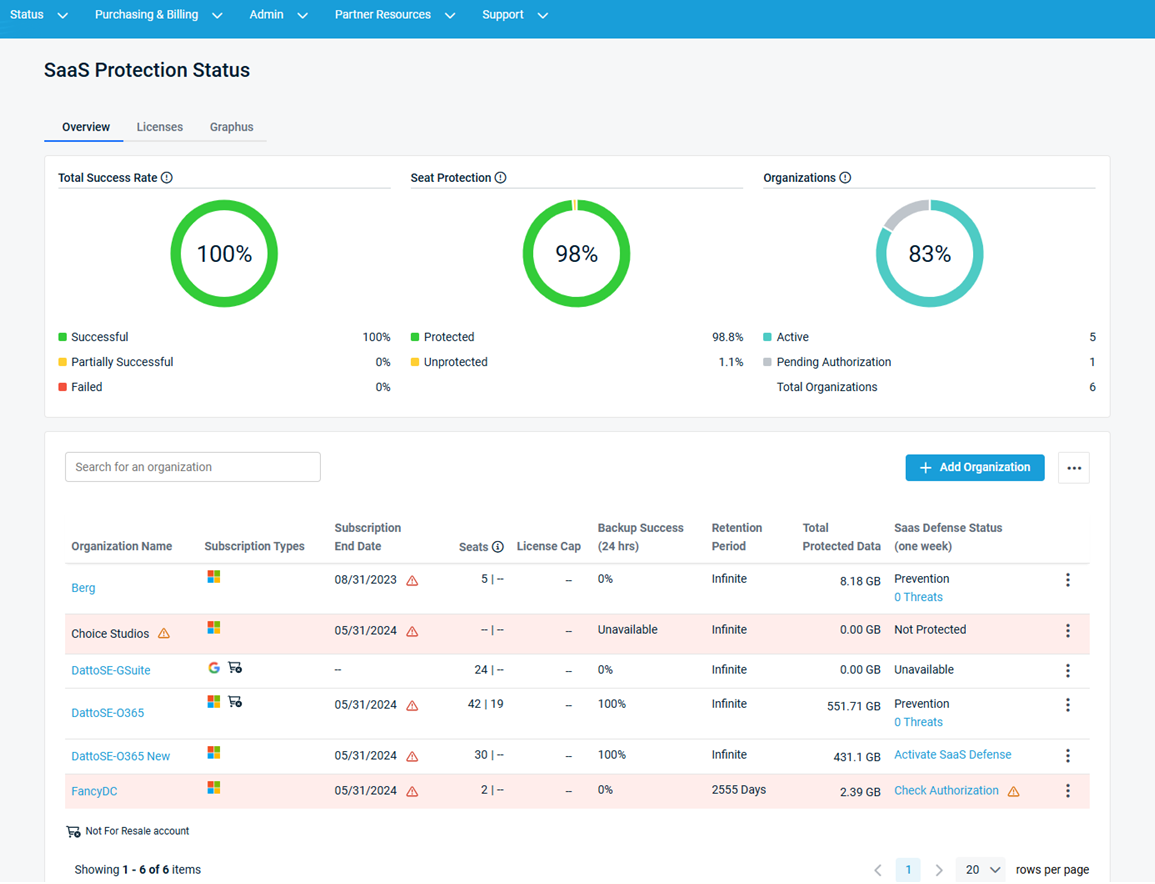
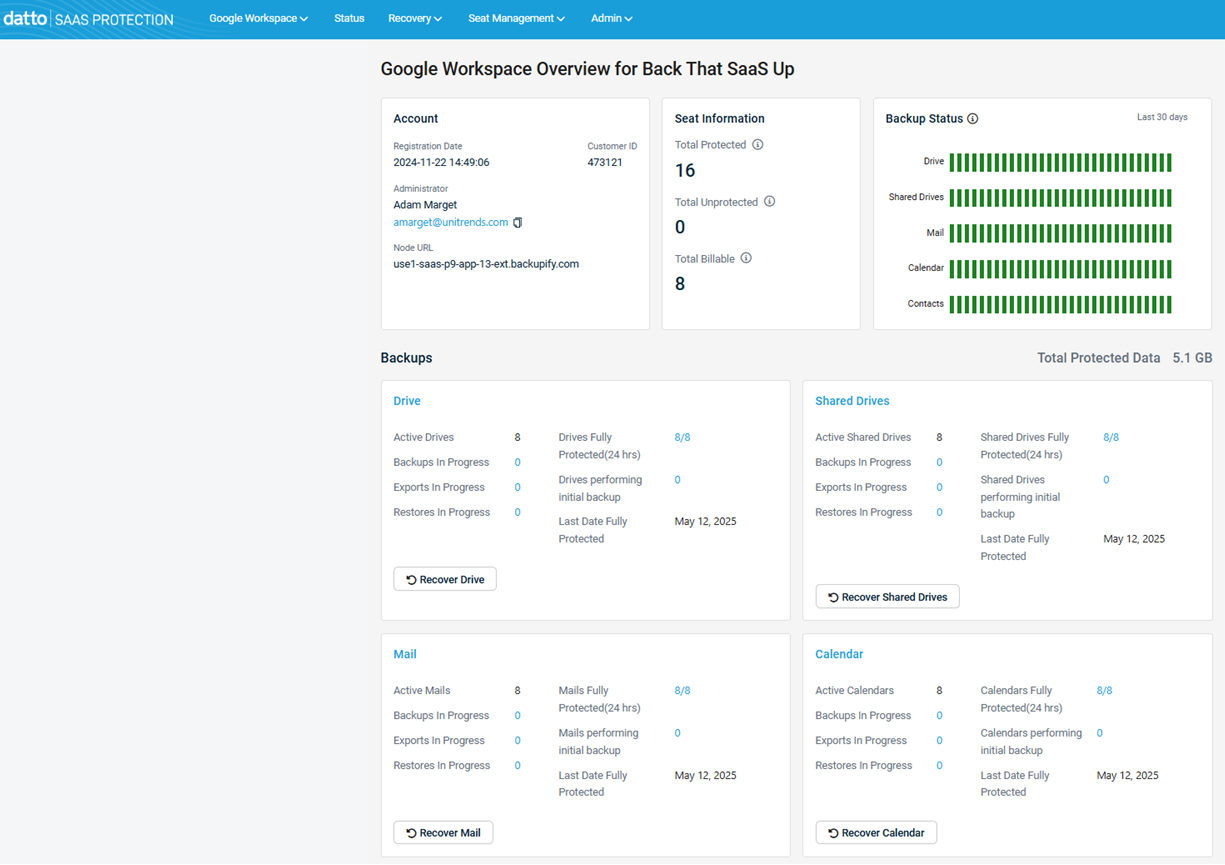
From the Datto Partner Portal, MSPs can view all tenants in a single dashboard. The interface provides visibility into each client’s total protected users, data volume, retention settings, and recent backup success rates.
Data Recovery and Restore Options
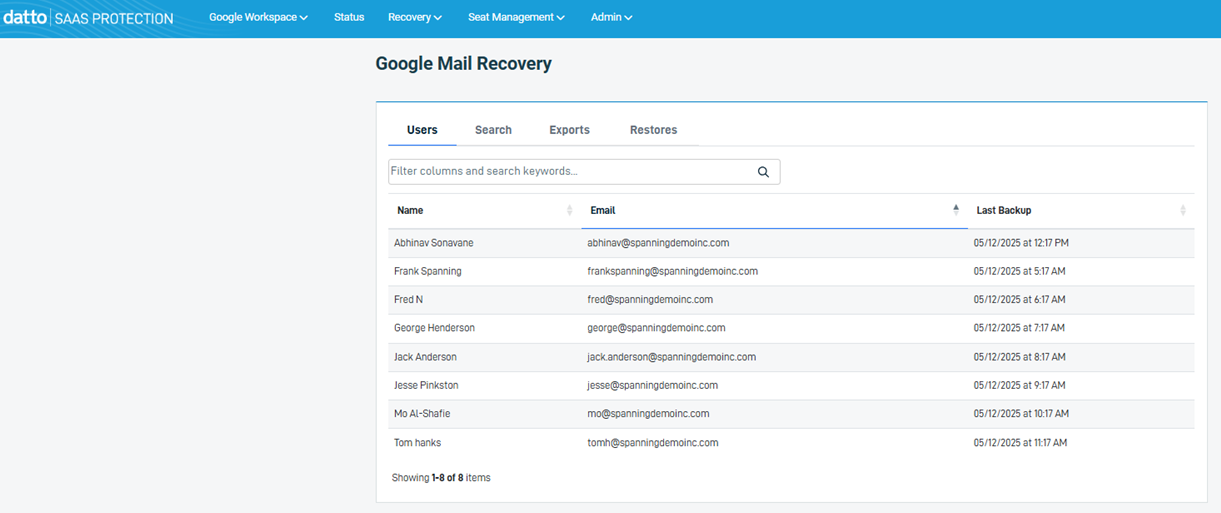
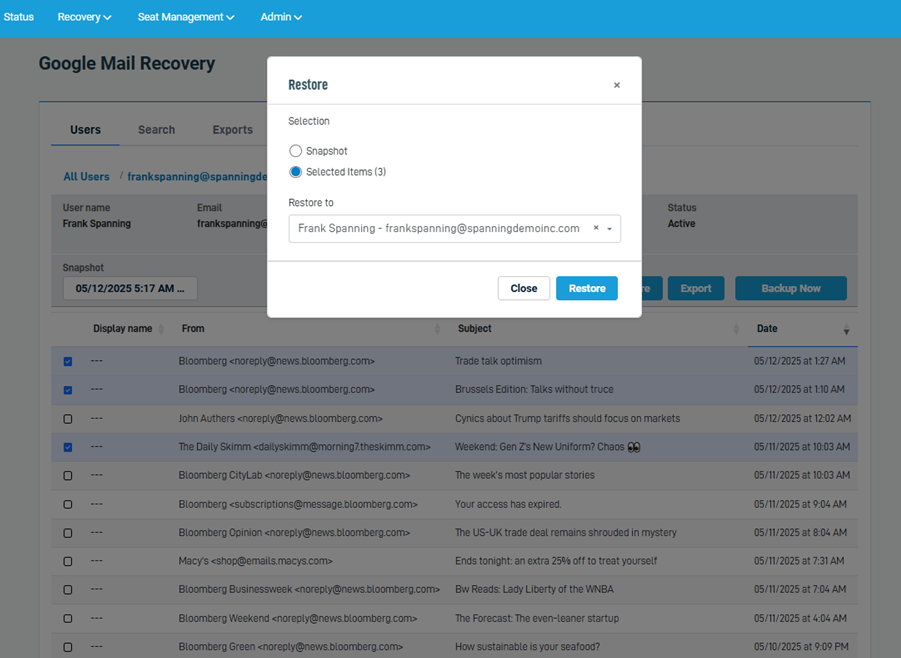
Datto SaaS Protection is particularly strong in its restore and export capabilities. The platform supports full and granular recovery at the file, folder, or user level. Admins can recover a full mailbox, a single email, a shared drive, or an entire OneDrive file tree. Restores can be directed to the original user, a new user, or exported as a .PST or other usable format for litigation or compliance needs.
Recovery operations are non-destructive. That means restored content is placed into a subfolder, rather than overwriting existing production data, reducing the risk of accidental loss during remediation. The platform maintains snapshots that enable time-based restore, so administrators can jump to a specific day and extract only what’s needed.
An advanced Boolean search engine lets MSPs locate content quickly across vast data sets. This feature is particularly useful during legal discovery, internal audits, or incident response, where speed and specificity matter.
Admins can also run on-demand backups to preserve the most current snapshot before a user is offboarded or transitioned. This is especially helpful when managing employee terminations or responding to potential insider threat scenarios.
Shared Mailboxes, Archived Licenses, and Cost Efficiency
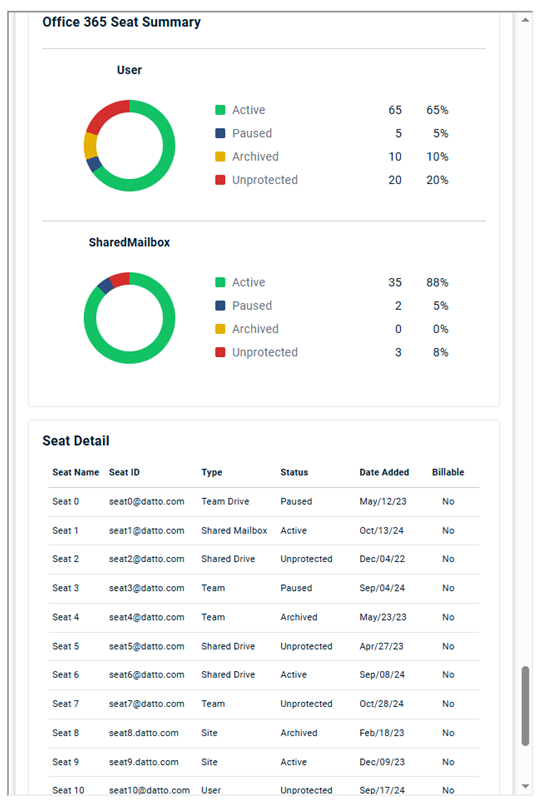
One of the more valuable capabilities for MSPs is the way Datto handles inactive users. In Microsoft 365, retaining access to a former employee’s data typically requires maintaining their license, which can be costly. Datto offers an archive license that stops active backups but retains all historical data for a user at a lower cost. This archived user data can still be restored as needed to another user’s account, a shared mailbox, or an exported file.
For clients focused on cost control, converting an inactive user to a shared mailbox (up to 50 GB in Microsoft 365) is also supported. This is a lower-cost alternative for low-volume users, but it may fall short for power users who exceed storage limits. In those cases, archive licensing provides more flexibility and legal defensibility without the burden of full-seat licensing.
This model is well suited to user life cycle management scenarios, such as managing long-term data for seasonal employees, contract workers, or executives.
Reporting, Alerts, and Visibility
MSPs benefit from customizable reporting and alerting tools. Admins can generate reports on backup health, user protection status, and storage metrics. These can be scheduled for internal review or sent directly to client admins, providing transparency around service quality and reinforcing the value of ongoing protection.
Reports can be exported in CSV or PDF format, and consolidated reports can span multiple backup services including SaaS, endpoint, and server backups.
Datto SaaS Protection also integrates with Autotask, generating tickets automatically in the event of backup failure and closing them upon successful retry. It also syncs license usage and seat counts with Autotask to support automated billing and contract alignment.
Integrations with IT Glue provide documentation consistency, while Datto RMM enables admins to access backup health and restore tools from within their endpoint management environments.
Security Awareness and Phishing Simulation
As part of Datto’s broader platform approach, SaaS Protection can be deployed alongside BullPhish ID for user training and phishing simulation. These tools help identify high-risk users, deliver remedial training, and align with broader zero trust initiatives.
This integration enables MSPs to approach user protection holistically—using backup for recovery, BullPhish for prevention, and SaaS Defense for detection. Combined, these solutions allow providers to offer a full-stack defense strategy around Microsoft 365 and Google Workspace.
Compliance and Retention Policies
The platform allows flexible retention policies, from short-term (e.g., 30 days, 1 year) to infinite retention. This accommodates both compliance obligations and legal risk mitigation strategies.
For example, some legal and finance teams prefer to keep only 2-3 years of data to limit liability during litigation. Datto allows MSPs to configure retention policies that align with these preferences while still enabling full control of export and audit capabilities.
The system logs all actions—including restores and exports—providing a complete audit trail for regulatory review or forensic investigations.
Use Cases and Risk Reduction
Datto SaaS Protection addresses a wide range of use cases, including:
- Recovery from accidental deletion, which accounts for nearly half of all SaaS data loss
- Protection against ransomware and malware that can corrupt or encrypt cloud-based data
- Business continuity during cloud service outages or access issues
- Protection against malicious deletion from disgruntled or departing employees
- Regulatory compliance and litigation readiness with long-term data retention
An IDC study cited during our hands-on product demo revealed that the average time to discover data loss is 140 days. Microsoft and Google recycle bins typically purge data after 30 days. This gap creates significant risk if no third-party backup is in place.
Real-world events have demonstrated that even major cloud providers experience service failures or deletion errors. In at least one case, a national pension provider lost critical user data due to a cloud configuration error—recoverable only through external backups.
Final Verdict
Datto SaaS Protection offers MSPs a mature, scalable, and integration-rich backup platform that addresses real risks with practical automation. It combines rapid deployment, enterprise-grade security, flexible pricing, and broad service coverage with features that simplify day-to-day operations.
From user-level restores to organization-wide audits, from phishing simulation integration to automated billing, the platform enables MSPs to deliver not just backup, but strategic data protection.
In today’s environment, where data is both a critical asset and a major liability, Datto SaaS Protection is not simply a convenience—it’s a requirement for organizations serious about resilience, recovery, and compliance.
If you’re an MSP and want more information on Datto SaaS Protection, or learn how you, too can become a Datto Partner, find out more here.
Edited by
Erik Linask